
 Independent guide · not the operator
How to Register a DMFirst Account
Registering takes a few minutes, but a few small mistakes cause most of the trouble: a mistyped number, a reused password, or a link from the wrong place. Here is the whole process, screen by screen, with the problems to watch for. You must be 21 or older.
For now the first button jumps to the steps below. Once the operator’s verified link is added, it opens the official registration page in a new tab.
Before You Start
Have these four things ready and the rest goes smoothly. It is much easier than stopping halfway to look for a document.
You are 21 or older
You will be asked to confirm it, and the operator may check it against your ID.
A valid ID within reach
Your legal name and date of birth must match what you type in the form.
Your own phone or email
The one-time code goes here, so it must be a number or address that only you control.
A new, strong password
Twelve characters or more that you have never used on another site.
Written by the DMFirst Editorial Team · Updated 8 Nov 2026
Table of Contents
Step-by-Step Registration
Do these steps on the operator’s own website or app. The screen on the left is the registration form in the DmFirst app. Your version may look a little different, but the order is the same.
Create your account
About 5 minutes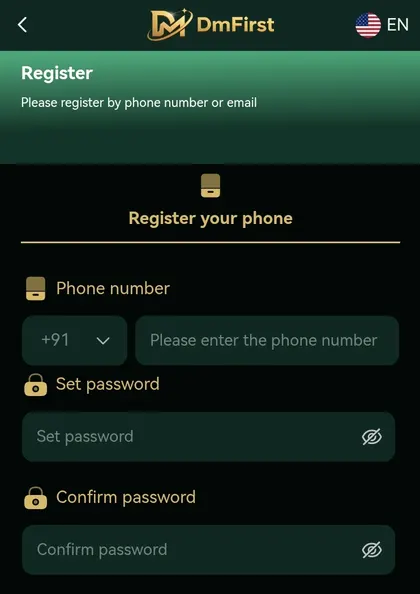
- Open the operator’s verified website or app from your own bookmark, then tap Register.
- Choose how you want to register: by phone number or by email. Pick the one you can always reach.
- Select your country code and type in your own number or email address. Check it twice.
- Set a password and confirm it. Twelve characters or more, and nothing you use elsewhere.
- If you see an Invite code field, fill it only when someone you know and trust gave you a code. Otherwise leave it empty.
- Read the terms and confirm you are 21 or older, then submit.
- Enter the one-time code you receive and complete ID verification if the operator asks for it.
What the Registration Screen Asks For
If a field looks unfamiliar, this table explains what it is for and what trips people up.
| Field | What to enter | Watch out for |
|---|---|---|
| Phone number or email | Your own number with the correct country code, or your own email address. | A typo here means the one-time code goes nowhere. |
| Password | Twelve characters or more, not used on any other site. | Do not reuse your email or banking password. |
| Confirm password | The same password again. Use the eye icon to check it. | Mismatched characters are the most common reason this step fails. |
| Invite code | Only a code given to you by someone you know and trust. Otherwise leave it empty. | Do not pay for codes or take them from groups. |
| One-time code | The code sent to your number or email after you submit. | Never share it with anyone, including “support” staff who contact you first. |
| ID verification | Your legal name and the document the operator asks for. | Names that do not match your ID will stall the check. |
Common Problems and Fixes
Most registration problems are small and fixable. Start with the simplest likely cause before you try anything else. If you are still stuck, read our full registration article or the FAQ page.
| Problem | Likely cause | What to try |
|---|---|---|
| No one-time code | Wrong number or email, weak signal, or the message was filtered. | Check the details, wait two minutes, look in spam, then use resend once. |
| Number or email already in use | You registered before, or someone typed your details. | Try the login page, then the Forgot password option. If it is not yours, contact official support. |
| Password rejected | Too short, or it breaks a rule shown under the field. | Use twelve characters or more with a mix of letters and numbers. |
| Verification fails | Name or date of birth differs from your ID, or the photo is unclear. | Retake the photo in good light and enter details exactly as printed on your ID. |
| The page looks different | The operator updated the app, or you are on a copy of the site. | Close it and reopen the operator’s verified link from your bookmark. |
Stay Safe While Registering
Read this onceFake registration pages are one of the most common scams around gaming sites. They copy the look of the real thing and collect your details. These habits protect you.
After You Register
Once your account is open, a few minutes of setup now saves problems later.
Set your limits first
Choose a deposit limit and a time reminder before you play, while you are calm.
How to set limits →Read the bonus terms
Find the wagering, the expiry and the withdrawal cap before you accept anything.
Read bonus terms →Bookmark the login
Save the official login page so you never need to open it from a message.
Login guide →Learn how rounds work
Every round is random. Understanding the house edge helps you stay realistic.
Randomness explained →Frequently Asked Questions
How do I register a DMFirst account?
Open the operator’s verified website or app, tap Register, and choose phone number or email. Enter your own details, set a password you have not used anywhere else and confirm it, accept the terms, and enter the one-time code you receive. The steps above show each screen in order.
Do I need to be 21 to register?
Yes. This guide is for adults aged 21 and over only, and you will be asked to confirm your age when you register. Registering with someone else’s details or on behalf of a minor is not allowed.
Can I register with an email instead of a phone number?
The registration screen says you can register by phone number or by email. Pick whichever you can reliably access, because that is where your one-time code will go and where you will look first if you ever need to recover the account.
What is the invite code field for?
It links your new account to the person who invited you, for the operator’s referral programme. You only need it if someone you know and trust gave it to you. If a stranger or a group chat handed you a code, leave the field empty or check with the operator first.
I did not receive my one-time code. What now?
Wait a minute or two, check that the number or email is typed correctly, and look in your spam or blocked-messages folder. Then try the resend option once. If it still does not arrive, contact support through the channel shown on the operator’s official site. Never accept a code or help from anyone who contacts you first.
Is it free to register?
Registering should cost nothing. If anyone asks you to pay a fee, a tax or an “activation” charge just to open an account, treat it as a scam and stop.
Can I have more than one account?
Operators normally allow one account per person, and duplicate accounts are a common reason for blocked withdrawals. Check the terms on the operator’s site before you register.
Buod sa Filipino
Dapat 21 taong gulang pataas ka at gamitin mo ang sarili mong numero ng telepono o email. Magrehistro lamang sa opisyal na website o app ng operator, at huwag ibigay kaninuman ang iyong password o one-time code. Bago maglaro, magtakda muna ng limitasyon sa deposito at oras.
Responsible Gaming
21+ only. Gaming costs money, and it is not a way to earn it. Decide how much you can afford to lose before you start, set deposit and time limits, and never try to win back what you have lost. If it stops being fun, take a break.
DMFirst (dmfir.st) is an independent information website. It does not operate games, accept deposits or handle player funds. Rules differ by country; only use operators licensed for your location. Disclaimer · Privacy · Terms